Golf Simulator Projector Keystone and Vertical Offset Formula: Complete Optical Alignment Guide
When engineering an indoor golf simulation studio, calculating the precise golf simulator projector keystone vertical offset formula dictates whether your impact screen delivers edge-to-edge optical clarity or suffers from digital scaling blur. Many simulator builders overlook native optical offset and attempt to correct angled projection geometry through aggressive digital keystone adjustments. Digital keystone artificially alters the projector display panel, discarding active display pixels and softening high-frequency visual details such as ball flight tracers, fairway textures, and green contours.
Achieving true native 4K or WUXGA resolution across a 16:9, 16:10, or 4:3 impact enclosure requires aligning projector mounting height with manufacturer lens geometry before tightening ceiling hardware. Projector lenses are manufactured with fixed or adjustable vertical offset parameters, meaning the center axis of the projection beam does not emerge centered relative to the lens glass. Inverting a ceiling-mounted projector shifts this projection cone downward, demanding rigorous mathematical planning to match enclosure top margins without digital warping.
Optical Alignment Key Takeaways
- Digital Keystone Degrades Native Resolution: Every 5 degrees of electronic keystone tilt discards roughly 8% to 14% of native panel pixels, transforming a crisp 4K UHD projection into an artificially scaled image with jagged raster artifacts.
- Vertical Offset Is Native Lens Geometry: Projector vertical offset percentage defines the distance between the center of the projection lens and the top or bottom screen boundary relative to total screen height.
- Lens Shift Preserves Optical Fidelity: Optical vertical and horizontal lens shift physically relocates internal glass elements, repositioning the projected frame without distorting pixel geometry or introducing processing latency.
- Ceiling Mount Calculation Rule: Always calculate the physical drop distance from your finished ceiling using the inverted offset formula rather than tilting the projector chassis toward the screen center.
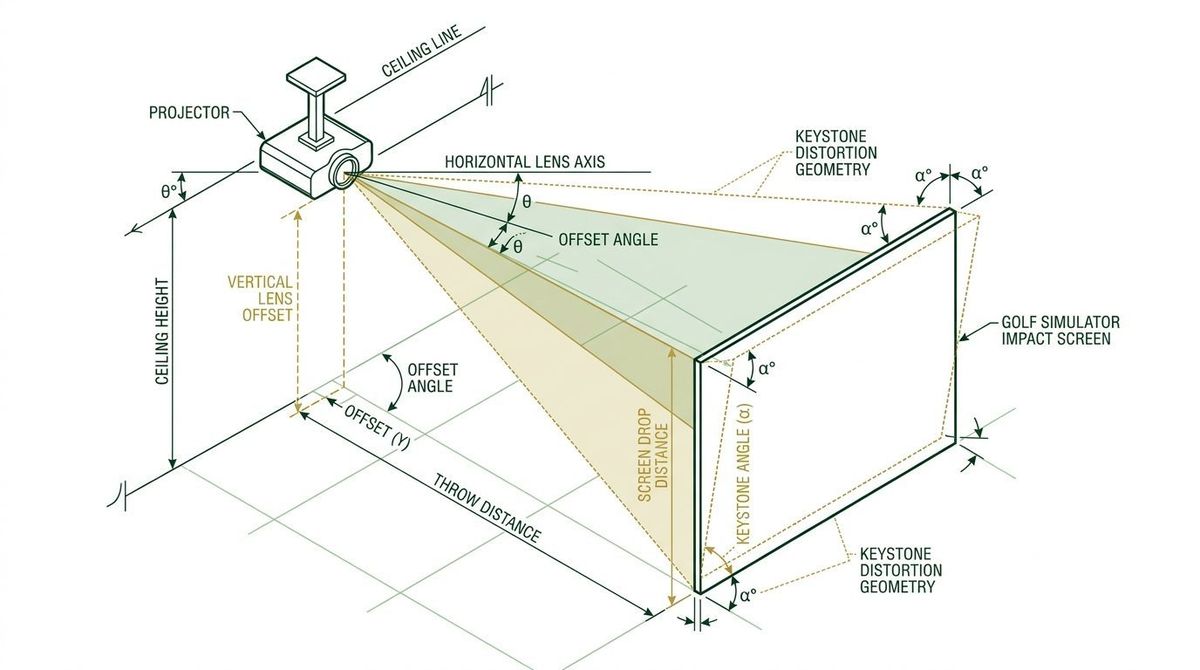
Understanding Vertical Offset and Projector Optical Geometry
Projector manufacturers specify vertical lens offset as a percentage of total image height. Unlike consumer flat-panel displays, a projector does not cast light symmetrically along the central barrel axis of the lens. Instead, the projection cone expands upward when floor-mounted or downward when ceiling-inverted. Understanding the manufacturer definition of vertical offset prevents installation miscalculations that force physical re-drilling.
A projector with a 100% vertical offset projects an image where the lens center aligns exactly flush with the top edge of the projected image when ceiling mounted in an inverted orientation. A projector with an offset greater than 100%, such as 115%, casts the image boundary further downward by an additional 15% of the total screen height. Conversely, an offset below 100%, such as 0% (found in certain ultra-short-throw models), indicates that the lens center aligns with the vertical midpoint of the screen.
The Vertical Offset Percentage Equation
To quantify the physical displacement between your projector lens center and the screen boundary, use the fundamental vertical offset formula:
Where \(H_{\text{screen}}\) represents the total height of the viewable impact screen surface in inches or millimeters, and \(\text{Offset \%}\) is the manufacturer-published native offset specification. For ceiling-mounted installations where the projector is inverted, a positive \(D_{\text{offset}}\) pushes the top edge of the projected image below the lens center, whereas a zero offset places the top edge level with the lens glass.
The True Cost of Digital Keystone Correction
Keystone distortion occurs whenever the projector lens optical plane is not strictly parallel to the surface of the impact screen. Tilting the projector downward or upward causes the projection cone to strike the screen obliquely, producing a trapezoidal image where the top and bottom widths differ substantially.
While modern digital projectors provide electronic keystone sliders, activating digital keystone forces the projector internal video scaler to compress rows of active pixels into a narrower simulated boundary. The remaining display panel pixels around the trapezoid are deactivated, casting a dim black trapezoidal border (the unprojected panel spill) onto your enclosure padding.
Beyond lost pixel density, digital keystone introduces noticeable frame processing latency (typically 12 to 28 milliseconds). In premium launch monitor setups tracking high-speed clubface impact, additional display lag creates a disorienting disconnect between the auditory impact sound and the on-screen ball launch visual.
The Complete Projector Ceiling Mount Height Formula
To avoid electronic keystone entirely, the physical mounting height of the projector chassis must be determined based on the impact screen dimensions, enclosure ceiling clearance, and projector vertical offset. The comprehensive mounting formula for an inverted ceiling installation is defined as:
Where \(H_{\text{screen\_top}}\) is the finished height of the top viewable screen edge above the floor, and \(\Delta H_{\text{lens\_shift}}\) represents the physical adjustment travel available via optical lens shift dials. If your projector features physical optical lens shift (such as \(\pm 20\%\)), you can adjust the image vertically across a broad window without touching digital keystone settings.
Step-by-Step Worked Mathematical Calculation
Consider a standard commercial-grade residential golf simulator build utilizing a 16:10 impact screen. The enclosure setup parameters are measured as follows:
- Screen Width (\(W_{\text{screen}}\)): 144.0 inches (12.0 feet)
- Screen Height (\(H_{\text{screen}}\)): 90.0 inches (7.5 feet)
- Impact Screen Top Edge (\(H_{\text{screen\_top}}\)): 114.0 inches above finished turf
- Ceiling Finished Height: 120.0 inches
- Projector Model A Native Vertical Offset: 110% (Fixed lens, no optical shift)
- Projector Distance to Screen (Throw Distance): 126.0 inches (Throw ratio 0.875:1)
Calculating the exact ceiling mount lens center position proceeds through three structured steps:
Step 1: Calculate the native vertical offset drop distance.
Because the projector is ceiling mounted and inverted, the 110% offset means the top boundary of the projected image emerges 9.0 inches below the center point of the lens.
Step 2: Determine required lens center elevation above finished turf.
Notice the critical engineering conflict: the required lens center elevation is 123.0 inches, but the finished ceiling height is only 120.0 inches. If an installer mounts this projector flush to the 120.0-inch ceiling (lens at 116.0 inches), the image top would land at \(116.0 - 9.0 = 107.0\) inches, falling 7.0 inches short of the screen top edge.
Step 3: Evaluate optical lens shift alternative.
Selecting an alternative projector with native optical vertical lens shift (\(\pm 30\%\)) permits mounting the lens center at 116.0 inches while shifting the beam optical path upward by:
\[\Delta H = 114.0 - (116.0 - 9.0) = +7.0 \text{ inches}\]
This 7.0-inch adjustment represents \(7.0 / 90.0 = 7.78\%\) of screen height, well within the 30% optical shift limit, entirely eliminating the need for digital keystone correction.
Optical Lens Shift vs. Digital Keystone Comparison Matrix
The comparative engineering table below highlights why commercial simulation centers mandate optical lens shift and strict physical mount positioning over electronic digital keystone compensation.
| Alignment Parameter | Optical Lens Shift | Digital Vertical Keystone | Corner Fit / Warp Adjustment |
|---|---|---|---|
| Adjustment Mechanism | Physical glass element relocation | Digital pixel interpolation & cropping | Multi-point polynomial mesh warping |
| Native Resolution Retention | 100% (Zero active pixel loss) | 82% to 92% (Significant pixel discard) | 75% to 88% (Severe scaling blur) |
| Input Latency Impact | 0.0 ms added latency | +12 ms to +28 ms display buffer delay | +18 ms to +35 ms processing overhead |
| Light Output Efficiency | 100% ANSI lumen transmission | 10% to 20% effective brightness loss | 15% to 25% brightness attenuation |
| Screen Border Spill | None (Clean rectangular boundary) | Trapezoidal gray halo on padding | Irregular illuminated light spillover |
| Recommended Golf Sim Application | Primary ceiling & floor alignment | Emergency trim only (< 2 degrees) | Curved panoramic enclosures only |
The table demonstrates that optical lens shift retains 100% of native projector resolution and adds zero display latency, whereas digital keystone and corner warping discard between 8% and 25% of native pixels while introducing up to 35 milliseconds of display lag.
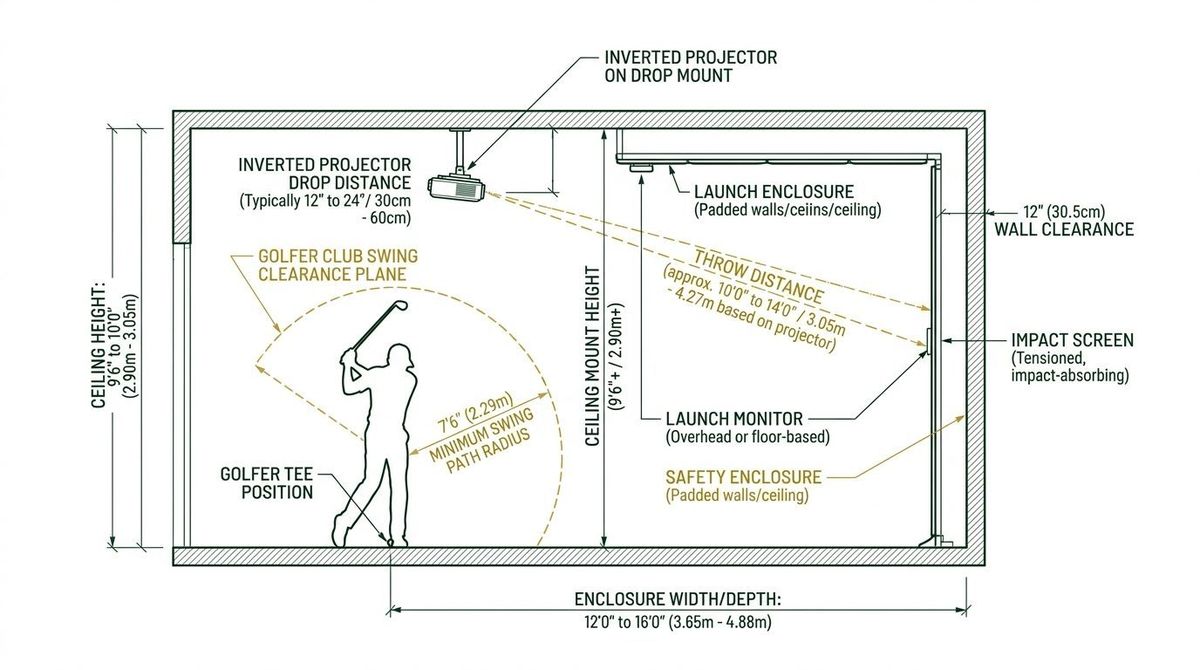
Practical Enclosure Clearance and Shadow Avoidance Rules
Aligning the vertical offset formula must also account for physical golfer clearance and golf club swing paths. A common installation error involves mounting the projector directly above or slightly behind the golfer tee position to achieve a desired throw distance, resulting in the golfer casting a distracting shadow onto the impact screen during the follow-through.
To eliminate shadows and clubhead strike hazards, golf simulator designers utilize short-throw projector lenses (throw ratios between 0.49:1 and 0.85:1). A short-throw lens allows mounting the projector 6 to 10 feet from the screen, positioning the unit comfortably in front of the golfer's 10-foot to 12-foot tee station. Furthermore, maintaining a minimum 12-inch vertical buffer between the top of the driver swing plane and the lowest point of the projector mounting bracket prevents catastrophic equipment damage.
Frequently Asked Questions
Can I mount my golf simulator projector right-side up on the ceiling?
Mounting a standard projector right-side up on the ceiling forces its positive vertical offset to project upward into the ceiling rafters rather than downward onto the impact screen. Inverted mounting is mandatory unless using a commercial projector equipped with 100% symmetrical vertical lens shift.
How does changing aspect ratio from 16:9 to 4:3 affect vertical offset?
Switching your simulation software aspect ratio from 16:9 to 4:3 on a native 16:9 projector deactivates the lateral edges of the display chip, leaving image height unchanged. However, if you zoom the lens to fill a taller 4:3 enclosure, screen height \(H_{\text{screen}}\) increases, expanding the physical offset drop distance proportionally.
What should I do if my ceiling is too high for the calculated mount height?
If your ceiling height exceeds the calculated mount position, use an adjustable threaded extension drop column (1.5-inch NPT pipe). Lowering the projector chassis physically maintains a level optical plane, preventing the trapezoidal keystone distortion caused by tilting.
Does horizontal keystone cause the same resolution loss as vertical keystone?
Yes. Horizontal keystone compresses vertical columns of pixels across the left or right screen edge. Combining both horizontal and vertical digital keystone compounds the resolution loss, reducing active display area by up to 30% and causing severe text illegibility on simulation HUD scorecards.
Optimize Your Simulator Projector Geometry
Accurate projector placement transforms an ordinary golf simulator into a photorealistic visual environment. Before purchasing mounting brackets or cutting ceiling drywall, calculate your precise room throw ratio, enclosure aspect ratio, and optical offset requirements using our interactive engineering tools at Golf Launch Monitor Fitter.