Golf Simulator Projector Lumens and Foot-Lambert Formula: 5 Essential Ambient Light Contrast Calculations
Applying the golf simulator projector lumens formula before purchasing a short-throw projector is the only way to prevent the number-one visual disappointment in home simulator builds: a washed-out, milky gray fairway image the moment you turn on a hitting-zone spotlight. As seen in weekly troubleshooting threads on r/Golfsimulator, builders routinely buy a 2,000-to-3,000-lumen home-theater projector designed for a pitch-black basement and mount it in front of a low-gain woven polyester impact screen inside a garage with window light or overhead LEDs. You can verify your exact throw distance, aspect ratio, and lumen requirements using the Golf Launch Monitor Fitter and run the optical physics equations below.
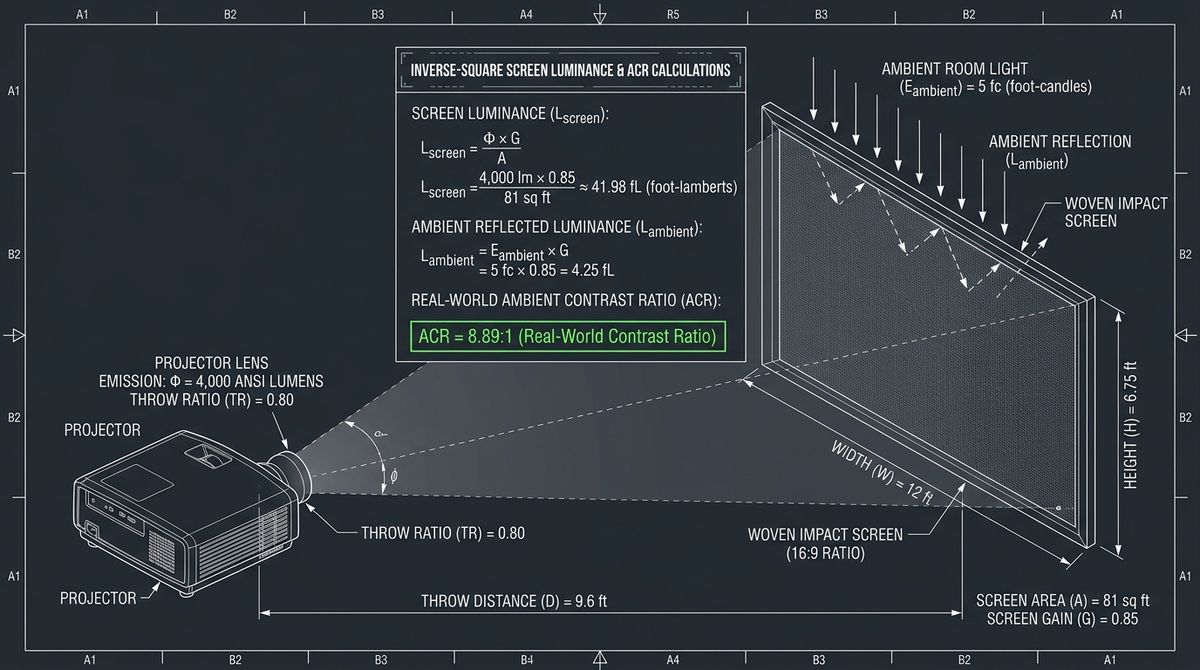
- The Foot-Lambert (\(\text{fL}\)) Formula: Screen brightness is \(\text{fL} = \frac{\text{Lumens}_{\text{ANSI}} \times G_{\text{screen}} \times \eta_{\text{aspect}}}{A_{\text{screen,ft}^2}}\). Always target 22 to 35+ Foot-Lamberts for a golf simulator bay with stance-area lighting.
- Why Impact Screens Eat Light (\(G_{\text{screen}} = 0.65\text{–}0.85\)): Unlike rigid vinyl cinema screens (\(G = 1.1\text{–}1.3\)), triple-layer woven polyester impact screens absorb and transmit 15% to 35% of projector light into the rear baffle.
- The Aspect-Ratio Scaling Penalty (\(\eta_{\text{aspect}}\)): Scaling a native 16:9 projector (`3840x2160`) to a 4:3 or 1:1 square enclosure crops away 25% to 44% of the active DMD micromirrors and rated ANSI lumens.
- The 5:1 Ambient Contrast Floor: Your projected white level must be at least 5 to 8 times brighter than the ambient room light reflecting off the screen (\(\text{CR}_{\text{eff}} \ge 5.0\)) so golf ball tracers remain crisp.
1. Why Cinema Projectors Look Washed Out on Golf Impact Screens
In a dedicated home theater, SMPTE-170M standards only call for 16 Foot-Lamberts (\(\text{fL}\)) of screen luminance because the audience sits in a 100% blacked-out room and projects onto a tensioned PVC screen with a reflective gain of \(G = 1.1\text{ to }1.3\). An indoor golf simulator violates both assumptions simultaneously:
- Safety & Photometric Camera Lighting: You cannot swing a driver at 110 mph in total darkness, and overhead or floor photometric cameras require ambient or pin-spot lighting on the hitting strip so you can see the ball and clubface.
- Sub-Unity Woven Polyester Gain (\(G_{\text{screen}} < 1.0\)): High-durability triple-layer spacer-mesh screens (like Carl's Place Premium or SIGPRO Softy) have thousands of microscopic yarn interstices that allow air and sound to pass through. Approximately 20% to 30% of incoming light passes straight through or scatters inside the 3D polyester weave, resulting in an optical gain of \(G_{\text{screen}} = 0.70\text{ to }0.82\).
2. Formula 1: The Effective Screen Foot-Lambert (\(\text{fL}_{\text{eff}}\)) Equation
To calculate how bright your impact screen will actually look to your eyes, convert the projector's verified ANSI lumens (\(\text{Lumens}_{\text{ANSI}}\)) into Effective Foot-Lamberts (\(\text{fL}_{\text{eff}}\)) across your active image area (\(A_{\text{screen,ft}^2} = W_{\text{ft}} \times H_{\text{ft}}\)):
$$\text{fL}_{\text{eff}} = \frac{\text{Lumens}_{\text{ANSI}} \times \eta_{\text{color}} \times \eta_{\text{aspect}} \times G_{\text{screen}}}{W_{\text{ft}} \times H_{\text{ft}}}$$
- \(\text{Lumens}_{\text{ANSI}}\) (Rated ANSI Lumens — Never "LED/Light Source Lumens"): As warned in r/Golfsimulator projector audits, cheap $300 Amazon projectors advertise "15,000 LED lumens" that translate to just 130–250 real ANSI lumens. Always use verified ANSI or ISO 21118 lumens.
- \(\eta_{\text{color}}\) (Rec.709 / Golf Mode Calibration Factor = \(0.72\text{–}0.80\)): Maximum rated ANSI lumens are measured in "Dynamic/Presentation" mode, which tints greens a sickly neon yellow. Switching to accurate Golf / sRGB / Cinema mode reduces raw lumen output by ~22% (\(\eta_{\text{color}} = 0.78\)).
- \(\eta_{\text{aspect}}\) (Active Pixel Fill Factor): When a native 16:9 (`3840x2160`) DLP projector is forced via NVIDIA Control Panel custom resolution to fill a 4:3 screen (`2880x2160`), 25% of the DLP chip's mirrors are switched off in black bars (\(\eta_{\text{aspect}} = 0.75\)). On a 1:1 square screen (`2160x2160`), 43.75% of the projector's light is lost (\(\eta_{\text{aspect}} = 0.5625\))!
- \(G_{\text{screen}}\) (Impact Screen Optical Gain): Use \(0.75\) for standard triple-layer polyester impact screens, or \(0.82\) if backed tightly by a white/light-gray acoustic baffle.
3. Formula 2: The Ambient Light Contrast Ratio (\(\text{CR}_{\text{ambient}}\)) Equation
Even a 4,000-lumen projector will look dull if floodlights or unshaded garage windows dump ambient illuminance (\(E_{\text{ambient}}\), measured in Foot-Candles \(\text{fc}\), where \(1\text{ fc} = 10.764\text{ lux}\)) directly onto the impact screen fabric. The Effective Ambient Contrast Ratio (\(\text{CR}_{\text{ambient}}\)) is governed by:
$$\text{CR}_{\text{ambient}} = \frac{\text{fL}_{\text{eff}} + \left(E_{\text{ambient,fc}} \times G_{\text{screen}}\right)}{\left(\frac{\text{fL}_{\text{eff}}}{\text{CR}_{\text{native}}}\right) + \left(E_{\text{ambient,fc}} \times G_{\text{screen}}\right)} \approx 1 + \frac{\text{fL}_{\text{eff}}}{E_{\text{ambient,fc}} \times G_{\text{screen}}}$$
To perceive rich Augusta-style fairway greens, deep shadow detail under trees, and a crisp white ball trace, you must maintain \(\text{CR}_{\text{ambient}} \ge 7.0 : 1\) (and an absolute minimum floor of \(5.0 : 1\)). Solving for the required ANSI lumens as a function of room ambient light at the screen (\(E_{\text{ambient,fc}}\)) yields our Master Golf Simulator Lumen Sizing Formula:
$$\text{Lumens}_{\text{required}} = \frac{\left(\text{CR}_{\text{target}} - 1\right) \times E_{\text{ambient,fc}} \times W_{\text{ft}} \times H_{\text{ft}}}{\eta_{\text{color}} \times \eta_{\text{aspect}}}$$
4. Complete Golf Simulator Projector Brightness & Screen Size Matrix
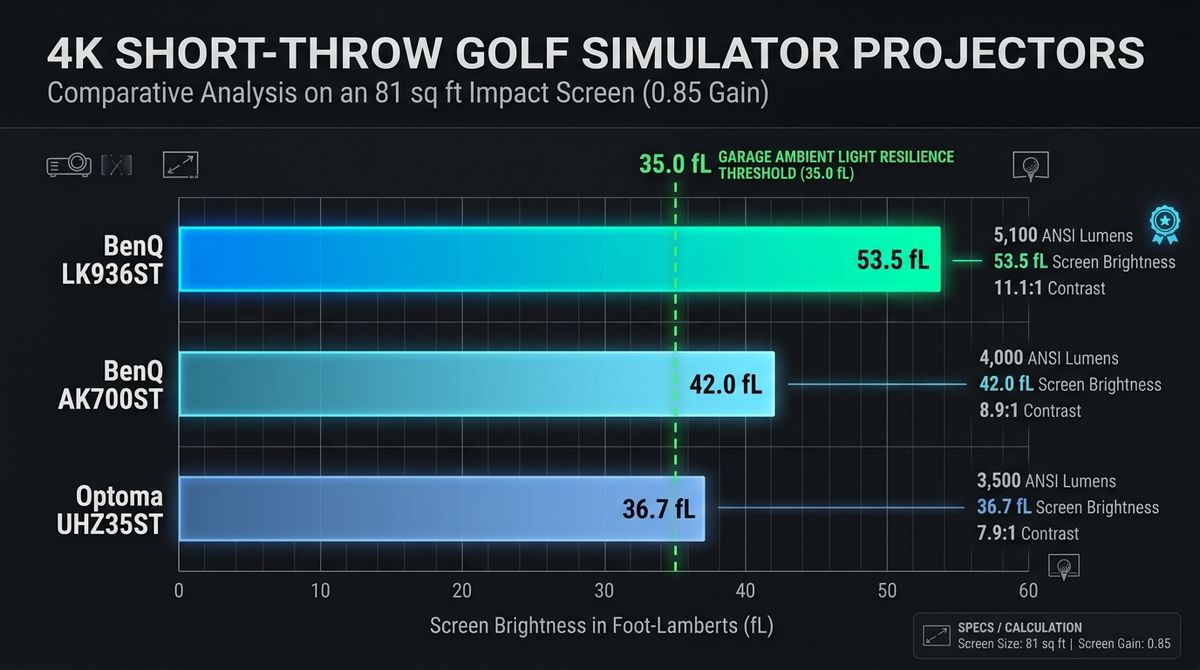
Compare how the four most popular golf simulator projector tiers perform on a standard 13 ft \(\times\) 9 ft 9 in (4:3, \(126.75\text{ sq. ft.}\)) and 16 ft \(\times\) 9 ft (16:9, \(144.0\text{ sq. ft.}\)) triple-layer impact screen (\(G_{\text{screen}} = 0.75\), \(\eta_{\text{color}} = 0.78\)):
| Projector Model & Tier | Rated ANSI Lumens | Effective \(\text{fL}\) on 16x9 Screen (16:9 Native) | Effective \(\text{fL}\) on 13x9.75 Screen (4:3 Crop) | Ambient Contrast at \(3.0\text{ fc}\) Spill | Recommended Bay Environment |
|---|---|---|---|---|---|
| Budget LED / Entry DLP (e.g., 2,000 ANSI lm) | 2,000 lm | 8.1 fL (Dim) | 6.9 fL (Washed Out) | 4.1 : 1 (Fails 5:1 floor) | 100% pitch-black room; small \(\le 10\times 8\text{ ft}\) screen only |
| BenQ TH671ST / TK700STi (3,000 ANSI lm Bulb) | 3,000 lm | 12.2 fL (Moderate) | 10.4 fL (Borderline) | 5.6 : 1 (Pass with canopy) | Dark basement/garage with 4–5 ft black enclosure side walls |
| BenQ AK700ST / AH700ST (4,000 ANSI lm 4K Laser) | 4,000 lm | 16.3 fL (Crisp) | 13.8 fL (Strong) | 7.1 : 1 (Sweet Spot) | Standard 12–16 ft wide home bays with stance pin-spotlight |
| BenQ LK936ST (5,100 ANSI lm 4K Commercial Laser) | 5,100 lm | 20.7 fL (Broadcast) | 17.7 fL (Vivid) | 8.9 : 1 (Commercial) | Large 16 ft+ commercial or garage bays with moderate ambient light |
Notice why the 4,000 ANSI lumen 4K laser tier (such as the BenQ AK700ST) and the 5,100 ANSI lumen BenQ LK936ST dominate r/Golfsimulator projector brightness upgrades: once you factor in the 0.75 woven screen gain and 4:3 pixel cropping, a 3,000-lumen bulb projector only delivers \(10.4\text{ fL}\) on a 13-foot-wide screen—and drops another 30% as the mercury lamp dims after 1,500 hours.
5. Worked Calculation: Sizing a Projector for a 12 ft \(\times\) 9 ft (4:3) Garage Bay
Suppose you are building a garage bay with a 12 ft wide \(\times\) 9 ft high (\(108\text{ sq. ft.}\)) 4:3 impact screen. Using a smartphone lux meter app held flat against the center of the impact screen with your garage overhead lights off and your hitting-mat pin-spot turned on, you measure \(24\text{ lux}\) of stray ambient light (\(E_{\text{ambient}} = \frac{24}{10.764} = \mathbf{2.23\text{ fc}}\)).
- Step 1 — Define Optical Parameters:
Screen Area \(A = 12 \times 9 = 108\text{ ft}^2\); Screen Gain \(G_{\text{screen}} = 0.75\); Color Calibration Factor \(\eta_{\text{color}} = 0.78\); 4:3 Cropping Factor on a 16:9 4K projector \(\eta_{\text{aspect}} = 0.75\); Target Contrast Ratio \(\text{CR}_{\text{target}} = 8.0 : 1\).
- Step 2 — Calculate Minimum Required ANSI Lumens:
$$\text{Lumens}_{\text{required}} = \frac{(8.0 - 1) \times 2.23\text{ fc} \times 108\text{ ft}^2}{0.78 \times 0.75} = \frac{7 \times 240.84}{0.585} = \frac{1,685.88}{0.585} = \mathbf{2,882\text{ ANSI Lumens}}$$
- Step 3 — Apply the 4-Step Ambient Light Shielding Protocol:
If you add a 4-foot-deep black commando-cloth enclosure canopy and replace your wide-beam floodlight with a \(15^\circ\) narrow-beam PAR20 LED pin-spot aimed straight down at the hitting strip, stray light hitting the screen drops from \(2.23\text{ fc}\) down to \(0.65\text{ fc}\)—boosting a 4,000-lumen projector's effective contrast ratio from \(10.7 : 1\) to a cinema-grade \(32.1 : 1\) without spending an extra dollar on projector hardware!
Frequently Asked Questions
How many ANSI lumens do I need for a golf simulator projector?
For a dark room with a full black enclosure canopy and a screen width of 10 to 12 feet, 3,000 to 3,500 ANSI lumens is the minimum recommended brightness. For wider 13-to-16-foot screens or garages with any ambient light leak, choose a 4,000 to 5,100 ANSI lumen laser projector.
Why is my 3,000-lumen projector dim when I set a custom 4:3 or 1:1 resolution?
Almost all modern 4K projectors use a native 16:9 (`3840x2160`) DLP chip. When you configure a custom 4:3 (`2880x2160`) or 1:1 (`2160x2160`) resolution in Windows so the image fits a square enclosure without stretching, the projector turns off the unused side mirrors, cutting total light output by 25% (on 4:3) to 43.75% (on 1:1).
Does putting a white sheet or grey blanket behind the impact screen increase brightness?
Yes. Hanging a white or light-grey acoustic moving blanket directly behind a single- or triple-layer impact screen reflects a portion of the transmitted light back through the weave, increasing effective screen gain (\(G_{\text{screen}}\)) from ~0.70 to ~0.82 (+17% brightness) while also preventing your rear wall framing studs from showing through the screen.
Conclusion: Calculate Your Throw Distance & Lumen Target Together
Brightness and throw distance are inextricably linked: mounting a projector too far back with zoom maxed out costs an additional 12% to 18% in lens light transmission loss. Use the Golf Launch Monitor Fitter right now to match your exact screen width, aspect ratio, ceiling height, and ambient light level to the optimal short-throw projector spec.