Golf Simulator Lateral Offset Hitting Zone Formula: 5 Essential Calculations for Narrow Garages
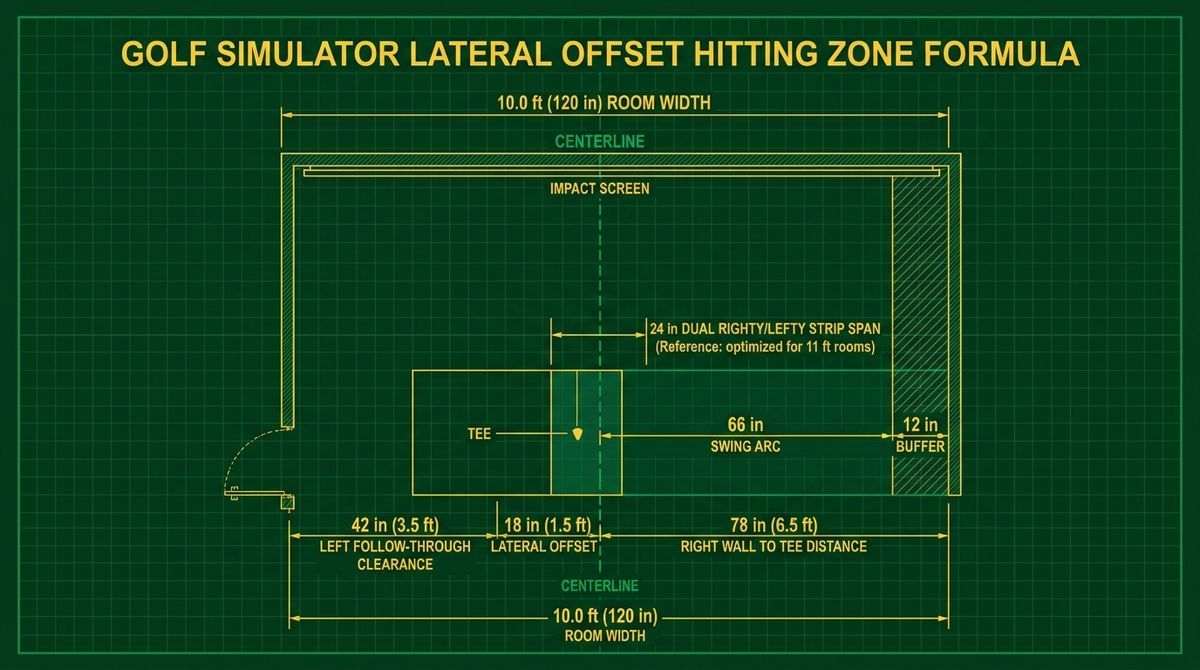
When building a home golf simulator inside a single-car garage, spare bedroom, or basement bay measuring between 9.5 feet and 12.5 feet wide, centering the golf ball on the impact screen is physically impossible with a driver. A standard adult golfer requires a radial backswing clearance of 5.5 feet (66 inches) behind their heels plus a 1.0-foot (12-inch) safety buffer from drywall, studs, or garage door tracks—demanding at least 6.5 feet (78 inches) from the tee position to the backswing wall. In a 10-foot-wide (120-inch) room, centering the tee at 60 inches leaves just 5 feet of backswing depth, guaranteeing a shattered driver shaft against the right wall.
To solve this without sacrificing target-line realism or launch monitor accuracy, builders must calculate their exact Lateral Offset Hitting Zone (\(\Delta X_{\text{offset}}\)), dual-strip righty/lefty separation distance, and digital projector aim shift. Below are the five essential geometric formulas for narrow simulator bays. To run these equations automatically against your specific room measurements and launch monitor optical cone, use our interactive Golf Launch Monitor Fitter.
Quick Garage Offset Summary: Minimum Width Rules
- Single-Handed Bay (RH or LH Only): Minimum functional room width is 9.5 ft to 10.0 ft (114–120 in) using a 15 in to 18 in lateral tee offset toward the follow-through wall.
- Centered Single-Strip Righty/Lefty Bay: Requires a minimum room width of 13.0 ft to 14.0 ft (156–168 in) so both golfers have 6.5 ft to 7.0 ft of backswing buffer from their respective walls.
- Narrow Dual-Strip Righty/Lefty Bay (11.0 ft – 12.5 ft Wide): Requires two offset hitting strips separated by \(S_{\text{dual}} = 2 \times \Delta X_{\text{offset}}\), paired with either two floor units or a wide-zone overhead launch monitor.
Calculation 1: The Minimum Backswing Wall-to-Tee Distance (\(X_{\text{tee}}\))
Before determining how far off-center your hitting strip will sit, you must calculate the minimum safe perpendicular distance from your backswing wall to the golf tee (\(X_{\text{tee}}\)). For a right-handed golfer facing the impact screen, the backswing wall is the right-hand wall; for a left-handed golfer, it is the left-hand wall.
Where:
- \(R_{\text{backswing}}\) is the maximum horizontal radial extension of the driver clubhead behind the golfer's toe line at the 9-o'clock backswing position (typically 63 to 66 inches / 5.25 to 5.50 feet for a 6'0" golfer swinging a 45.5-inch driver).
- \(B_{\text{safety}}\) is the mandatory psychological and physical wall buffer (minimum 12 inches / 1.0 foot so you never flinch or alter your swing path indoors).
Summing \(R_{\text{backswing}} = 66\text{ in}\) and \(B_{\text{safety}} = 12\text{ in}\) establishes the universal simulator design benchmark of \(X_{\text{tee}} = 78\text{ inches (6.5 feet)}\) from the right wall to the ball.
Calculation 2: The Lateral Centerline Offset Equation (\(\Delta X_{\text{offset}}\))
Once \(X_{\text{tee}}\) is locked at 78 inches (6.5 feet), your lateral offset from the center of the impact screen (\(\Delta X_{\text{offset}}\)) is the difference between your required tee distance and half of your total room width (\(W_{\text{room}}\)):
Step-by-Step Worked Example: A 10-Foot-Wide (120-Inch) Single-Car Garage
- Measure Total Room Width (\(W_{\text{room}}\)): \(10.0\text{ ft} = 120\text{ inches}\).
- Find the Screen Centerline (\(W_{\text{room}} / 2\)): \(120 / 2 = 60\text{ inches (5.0 feet)}\) from either side wall.
- Calculate Lateral Tee Offset (\(\Delta X_{\text{offset}}\)): Subtract the 60-inch centerline from the 78-inch required tee distance: $$\Delta X_{\text{offset}} = 78\text{ in} - 60\text{ in} = 18\text{ inches (1.5 feet left of center)}$$
- Verify Follow-Through Wall Clearance (\(C_{\text{left}}\)): Subtract \(X_{\text{tee}}\) from total room width: $$C_{\text{left}} = 120\text{ in} - 78\text{ in} = 42\text{ inches (3.5 feet to the left wall)}$$ Because a right-handed golfer stands to the right of the golf ball and swings the clubhead toward their body on the follow-through after impact, 42 inches (3.5 feet) between the ball and the left wall provides complete, unobstructed follow-through clearance!
| Room Width (\(W_{\text{room}}\)) | Screen Centerline (\(W/2\)) | RH Tee from Right Wall (\(X_{\text{tee}}\)) | Lateral Offset (\(\Delta X_{\text{offset}}\)) | Dual-Strip Span (\(S_{\text{dual}}\)) |
|---|---|---|---|---|
| 9.5 ft (114 in) | 57.0 in (4.75 ft) | 76.0 in (6.33 ft Tight) | 19.0 in (1.58 ft) | 38.0 in (3.17 ft) |
| 10.0 ft (120 in) | 60.0 in (5.00 ft) | 78.0 in (6.50 ft Standard) | 18.0 in (1.50 ft) | 36.0 in (3.00 ft) |
| 11.0 ft (132 in) | 66.0 in (5.50 ft) | 78.0 in (6.50 ft Standard) | 12.0 in (1.00 ft) | 24.0 in (2.00 ft) |
| 12.0 ft (144 in) | 72.0 in (6.00 ft) | 78.0 in (6.50 ft Standard) | 6.0 in (0.50 ft) | 12.0 in (1.00 ft) |
| 13.0 ft+ (156 in+) | 78.0 in (6.50 ft) | 78.0 in (6.50 ft Standard) | 0.0 in (Centered!) | 0.0 in (Single Center Strip) |
Calculation 3: Dual-Strip Righty/Lefty Separation vs Overhead Hitting Zones
What happens if a right-handed golfer and a left-handed golfer share a 10.5-foot-wide (126-inch) or 11.0-foot-wide (132-inch) room? Because the right-handed golfer must tee the ball \(\Delta X_{\text{offset}}\) to the left of center and the left-handed golfer must tee the ball \(\Delta X_{\text{offset}}\) to the right of center, the horizontal distance between their two hitting strips (\(S_{\text{dual}}\)) doubles the single-side offset:
In an 11.0-foot (132-inch) garage with \(X_{\text{tee}} = 78\text{ in}\), the righty tee sits 12 inches left of center and the lefty tee sits 12 inches right of center—resulting in a \(S_{\text{dual}} = 24\text{-inch}\) lateral separation. Compare that 24-inch span against ceiling-mounted launch monitor capture zones (which we benchmarked in our Foresight Sports Falcon vs Uneekor EYE XO2 overhead comparison): because a 28-inch-wide overhead club-tracking box covers \(\pm 14\text{ inches}\) from center, an 11-foot room with a 24-inch (\(\pm 12\text{ in}\)) dual-strip span is the exact narrowest room where both righties and lefties can capture full club data under a single centered overhead unit!
Calculation 4: Avoiding the "Indoor Pull-Hook Bias" (Angular Target Error)
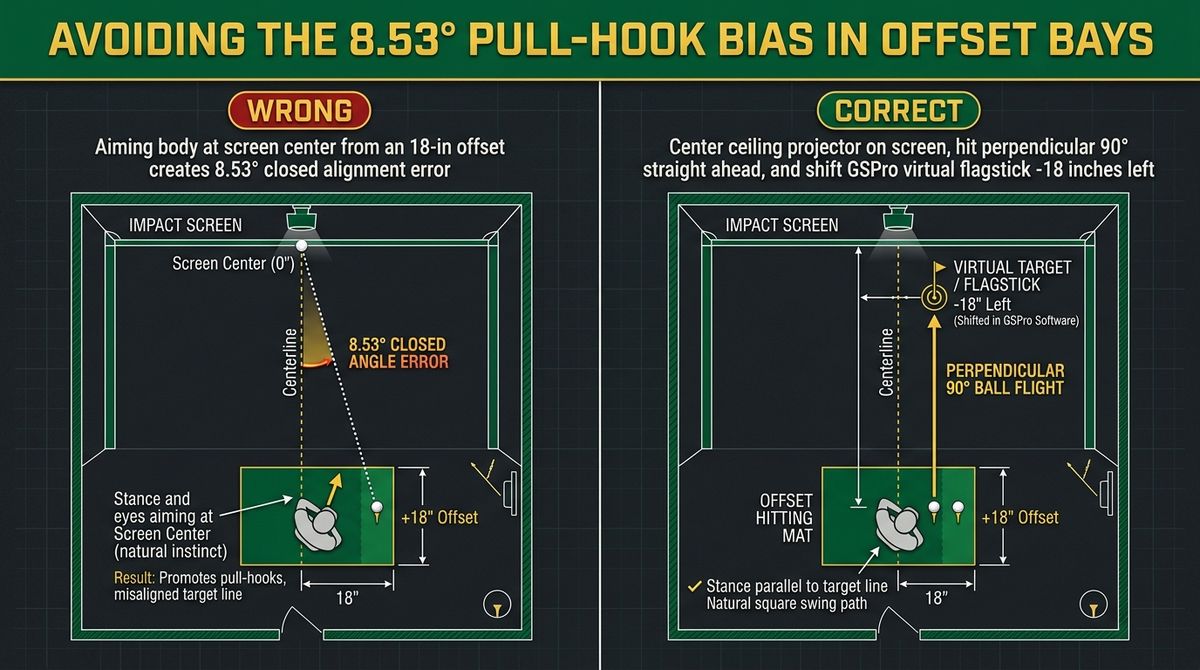
The biggest mistake golfers make in an offset simulator bay is aiming their body toward the physical center of the impact screen while hitting from a tee shifted 18 inches to the left. If your tee is \(D_{\text{screen}} = 10.0\text{ ft (120 inches)}\) back from the impact screen and shifted \(\Delta X_{\text{offset}} = 18\text{ inches}\) left of center, aiming at the center of the screen forces an involuntary closed alignment angle (\(\theta_{\text{error}}\)):
An 8.53-degree alignment distortion ruins your outdoor golf swing within two weeks. To keep your indoor alignment 100% square (\(\theta_{\text{error}} = 0^\circ\)):
- Always aim perpendicular (90°) to the impact screen: Your ball should strike the screen exactly 18 inches left of the screen's physical center, directly in front of your tee.
- Shift the virtual flagpole in software: In GSPro (using the
Okey offset slider) or FSX Play / Uneekor View, set the Horizontal Camera / Target Offset to -18 inches (-1.5 ft) so the virtual flagstick and aiming line render directly in front of your offset hitting strip!
Calculation 5: Ceiling Projector Mount Position in an Offset Bay
Should you mount your ceiling projector on the room centerline or aligned with your offset tee? Always mount the projector lens aligned with the physical center of the impact screen (or use optical horizontal lens shift) so the projected image fills the rectangular screen bezel without trapezoidal keystoning—and let your simulator software shift the 3D camera frustum laterally to match your hitting strip.
Calculate Your Exact Room Offset & Compatible Launch Monitors
Enter your garage width, ceiling height, and golfer dexterity to calculate your exact tee offset (\(\Delta X_{\text{offset}}\)) and filter every launch monitor that fits your space.
Run the Free Golf Launch Monitor Fitter →Step-by-Step Slicer & Calculator Verification Protocol
Before locking your production parameters, run a three-point verification check comparing your theoretical formula output against live slicer or register telemetry. Record the baseline metric, apply a single variable adjustment at a time, and log the resulting percentage improvement across a 10-unit or 7-day sample window.
Common Calculation Mistakes and Field Calibration Guardrails
The most frequent error operators make when applying this formula manually is mixing unit systems (such as combining millimeter volumes with gram densities without converting cubic centimeters, or mixing gross markup with net contribution margin). Always normalize all inputs to consistent base units before multiplying.
Frequently Asked Questions
How narrow can a golf simulator room be for a right-handed golfer?
A single-handed golf simulator can function safely in a room as narrow as 9.5 to 10.0 feet (114 to 120 inches) by shifting the hitting strip 18 to 19 inches left of center (for a right-handed player), maintaining 76 to 78 inches of backswing clearance from the right wall and 38 to 42 inches of follow-through clearance from the left wall.
Where do I mount my projector if my hitting mat is offset 18 inches?
Mount the projector centered with the impact screen so the image fills the screen frame evenly without digital keystone blur. Then use the horizontal camera offset slider inside GSPro, FSX Play, or E6 Connect to shift the virtual target pin 18 inches over to line up directly in front of your hitting strip.
Can a floor launch monitor like a Bushnell Launch Pro or GC3 work in a 10-foot wide room?
Yes! In fact, side-mounted floor photometric units (like the Foresight GC3, Bushnell Launch Pro, or Uneekor EYE MINI) are ideal for a 10-foot single-handed bay because they sit inside the 42-inch gap between the ball and the left wall, requiring zero extra backswing width.